
Build the game with your mouse. Code it in real Python.
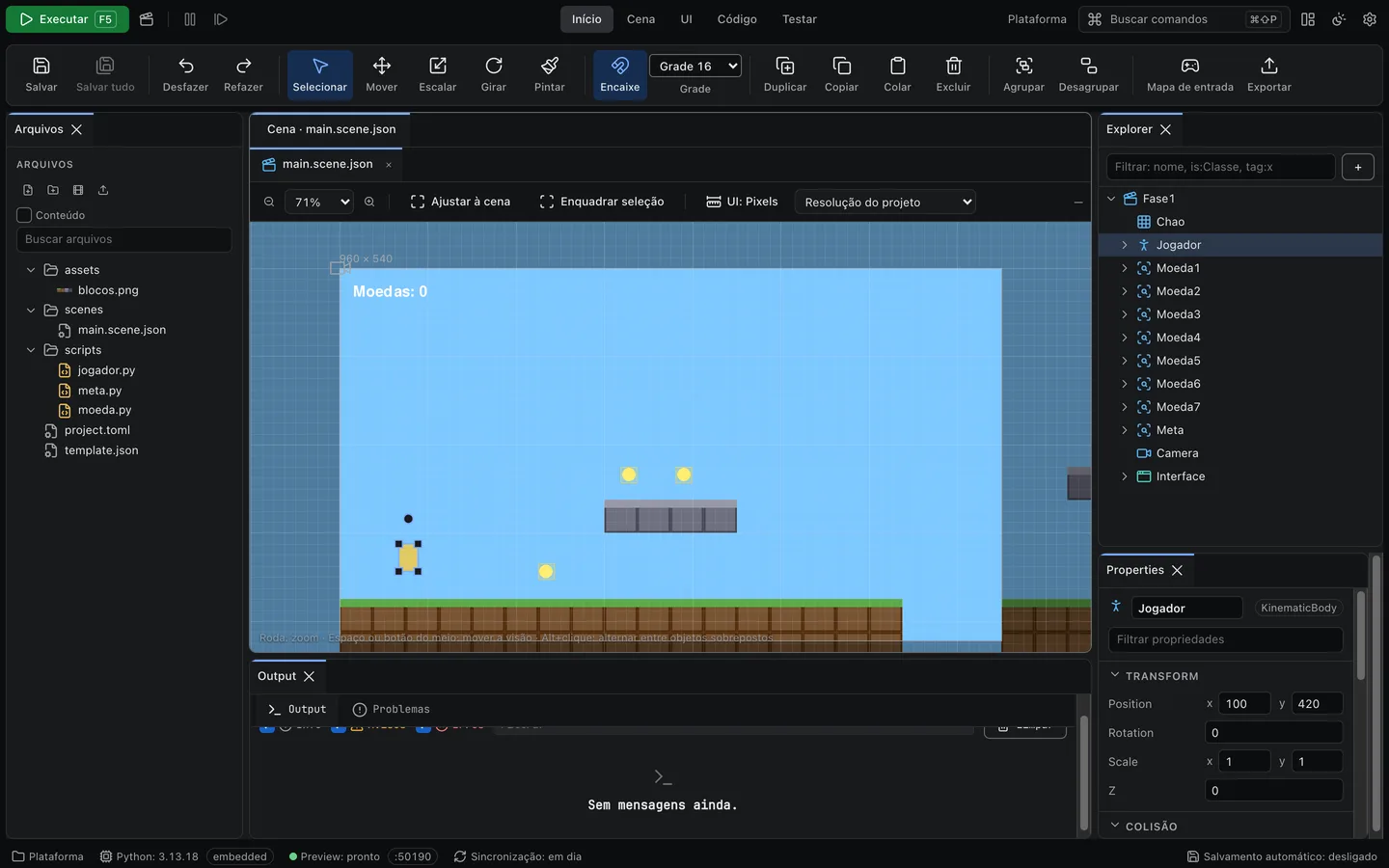
Pygame Studio is a desktop editor for making 2D games on pygame-ce. Drag objects around the scene, write Python scripts with autocomplete and press Run to play. Python comes with the installer.
macOS (Apple Silicon tested) · Windows, Linux and Intel Mac are experimental · license to be decided
- Python 3.13 built in: nothing else to install
- Text projects: .scene.json and .py, clean git diffs
- Games run without the editor
- Your code, no magic: Python you can read
From the first sprite to an exported game
Build levels with the mouse
Select, drag, resize and rotate objects right in the scene. The grid and snapping help, and holding Cmd/Ctrl turns snapping off while you drag.
Paint tile maps
The Paint tool has a brush, an eraser, a bucket fill and a rectangle. You can also import Tiled maps (.tmx and .tmj).
Script behavior in Python
Any object can have a script with on_ready, on_update, on_draw and on_input. Fields you mark with export show up in the properties panel.
Make menus and score displays
Panels, labels, buttons and images, with list and grid layouts that arrange things for you.
Add collision, camera, animation and sound
Box collision bodies, a camera that follows the player, animated sprites, timers, tweens and volume per group (music, effects, interface).
Read keyboard, mouse and gamepad
You create actions like "jump" and record the key or button in the Input map.
From an empty project to a running game
Create a project
Pick a template (Empty, Platformer, Top-down or Puzzle). The editor sets up the project's Python environment for you.
Build and code
Place objects in the scene with the mouse and attach a script to whatever needs to move. The editor suggests names as you type.
Press Run (F5)
The game opens in its own window. If something breaks, the game pauses and the Output shows the file and line. Click it, fix the code, save, and the game picks up where it stopped.
Your game stays Python
Scripts are plain Python classes attached to an object in the scene. The editor does not write hidden code or lock your project in a closed format. A scene is a readable JSON file, settings live in a project.toml, and all of it fits in a git repository with clean diffs.
The game runs without the editor, on the pgstudio runtime and pygame-ce. If you ever want to move on from the Studio, the code is still yours and still readable.
from pgstudio import Behavior, KinematicBody, Vec2, export


class Jogador(Behavior[KinematicBody]):
    velocidade: float = export(240.0, min=0)
    pulo: float = export(620.0, min=0)

    def on_ready(self) -> None:
        self.v = Vec2(0, 0)

    def on_update(self, dt: float) -> None:
        self.v.x = self.input.axis("esquerda", "direita") * self.velocidade
        if self.input.pressed("pular") and self.node.on_floor:
            self.v.y = -self.pulo
        self.v.y += 1500 * dt
self.v = self.node.move_and_slide(self.v, dt)An editor for beginners and for people who already code
Scene
Zoom with the wheel, pan with the middle button or Space, press F to frame the selection. Arrow keys move 1 px, Shift+arrows move 10 px.
Explorer
The scene's object tree. Drag to reorder or reparent, rename with F2, hide and lock objects.
Properties
Fields match the object type: number, color, vector, file. Press F1 on a property to see what it does.
Files
Image thumbnails, sound and font previews. Drop an image into the scene and it becomes a Sprite.
Code editor
Syntax highlighting, autocomplete, signature help, go to definition and errors underlined as you type.
Output
Shows the game's print calls and errors. Click an error to open the script at that line.
Undo anything
Cmd/Ctrl+Z undoes any edit, including the ones you made with the mouse.
Make it yours
Dark, light and high contrast themes, code colors, fonts, interface scale, editable shortcuts, a command palette and saved panel layouts. Interface in English and Portuguese.
Take your game out of the editor
Under File > Export game, the Studio builds a program for the system you are running the editor on. Players do not need Python installed. The first export downloads PyInstaller, so it needs an internet connection.
There is also a Browser (web) option, still experimental: it builds a folder with index.html using pygbag. It needs internet to build and to play, and the folder has to be served over HTTP. Experimental
You cannot export for another system yet (for example, building a .exe on a Mac). Export has only been tested on Apple Silicon macOS.
Who it is for
People starting out in game making
You see the game laid out on screen from the first minute and only write code where you need it. The templates work as examples to open and poke at.
People who already use pygame
No more nudging positions by hand and restarting. You get a visual scene, collision, camera and UI, and pygame-ce is still there when you want to call it directly.
Teachers and students
Projects are text, so you can review, compare and hand them in through git. Errors point to the file and line, and F1 explains every property.
Not there yet
- Debugger with breakpointsComing soon
- PrefabsComing soon
- Rigid body physics (pymunk)Coming soon
- 2D particles and lightsComing soon
- PluginsComing soon
- ProfilerComing soon
Quick questions
- Do I need to install Python?
- No. The installer ships with Python 3.13, and each project gets its own environment.
- Do I need to know Python?
- Not to build the scene. To make the game respond to keys, yes, but a little goes a long way. The tutorial uses a 15 line script.
- Is it ready to use?
- This is version 0.1.0. You can make a complete game, but some parts are missing and only Apple Silicon macOS has been tested.
Make your first game today
Download the editor, open the Platformer template and press Run. Then follow the tutorial to build one from scratch in about 15 minutes.